Tuesday, 2 December 2014

Building a museum of museums on the web

Last week on my teaching placement I delivered the lesson: 'Painting Techniques - Impressionism and Post Impressionism'.  Within this I delivered a PowerPoint I had put together, to aid my explanation of these art movements and the major artists and artworks associated with them.  
The class was engaged, enjoyed the presentation, were able to discuss the art movement with me and name additional artists and artworks within the movement.

This was all fine but it had its limits.  When I gave a demonstration on the painting techniques of Monet and Van Gogh I was not able to show on the PowerPoint nor on bing, clear images of the brushstrokes of the artists featured in my lesson.  I have since found the Amit Sood TED talk 'Building a museum of museums on the web'.

This TED talk has inspired me to use the Google Art Project in future lessons https://www.google.com/culturalinstitute/project/art-project and to look for on-line art education resources.  Perhaps Amit's point that this is to supplement the experience of going to a museum rather than replicate the experience is true (Sood, 2011).  It could be a way of engaging young people into visiting museums and galleries. As for the point I made earlier about wanting to see brushstrokes of Impressionist artists, Amit has the answer: 
"What if you want to see the brushstrokes?  And what if you want to see how Van Gogh actually created a masterpiece? You zoom in. You really go in." (Sood, 2011). While this would not be possible on web images with thousands of pixels on Google Art Project with around 10 billion pixels you can


These images are of Van Gogh's famous 'The Starry Night', they are screenshots of zooming further and further into the painting.  This is amazing, new, unique and go further into the painting than what we would be able to see in a museum, further than we would ever see. This is a really brilliant teaching aid and one I will be definitely using with my class soon.

Reference
Sood, A. (2011) 'Building a museum of museums on the web'. From transcript available at: 

Bibliography

Wednesday, 12 November 2014

To Bing or not to Bing?

I began teaching from my own Scheme of Work on Friday 21 Nov.  I was asked by a student, during a class discussion and slide show on Impressionism, about further work by Van Gogh.  I had no extra slides on Van Gogh prepared so I 'Googled' him.  In fact as Pembrokeshire College computers do not use Google I actually I 'Bing'd' him.  


I always use Google at home and was happy surprised to find Bing superior to Google.  Superior in that the images were all relevant and there is an option to play images as a slide show, whilst keeping an eye on the images due to come up in the order of slides at the bottom.

Bing is owned by Microsoft and is a major competitor with Google and was launched in 2009.  In Bing's bid to become the main competitor of Google it announced in 2011 it would power Yahoo's organic results.

I had no idea that Bing had quietly been evolving but as Bing's Corporate Vice President, Mike Nichols says: "We continued testing our results [...] Bing was regularly beating Google in web search results quality. [...] It's time to break the Google habit – you deserve more from your search engine."(Nichols, 2012)

Well, needless to say I do deserve more from my search engine, so I rushed to "Bing it on"
This screenshot above shows the results of my bing vs Google test.  Not entirely conclusive but there you go!  I may yet break the Google habit, time will tell. 

References
Nichols, Mike (2012) ‘Take the Bing It On Challenge!’. Available at: http://blogs.bing.com/search/2012/09/06/take-the-bing-it-on-challenge/ [Accessed: 12th November 2014]

Bibliography
Altoft, P, (2014) ‘Yahoo Organic results powered by Bing from 3rd August in UK’. Available at: http://www.branded3.com/blogs/yahoo-organic-results-powered-by-bing-from-3rd-august-in-uk/ [Accessed: 12th November 2014]
Bing, (2014) ‘Bing it on’, Available at: http://www.bingiton.com [Accessed: 12th Novmber 2014]
Ward-Bailey, J. (2014) ‘Search engine wars: Microsoft invite Google to “Bing it on”’. Available at: http://www.csmonitor.com/Innovation/Horizons/2012/0907/Search-engine-wars-Microsoft-invites-Google-to-Bing-It-On. [Accessed: 12th November 2014]
Bing (2014) Available at: http://www.bing.com/images/search?q=Post%20Impressionism%20Van%20Gogh [Accessed: 12th November 2014]

Friday, 24 October 2014

One last mind map

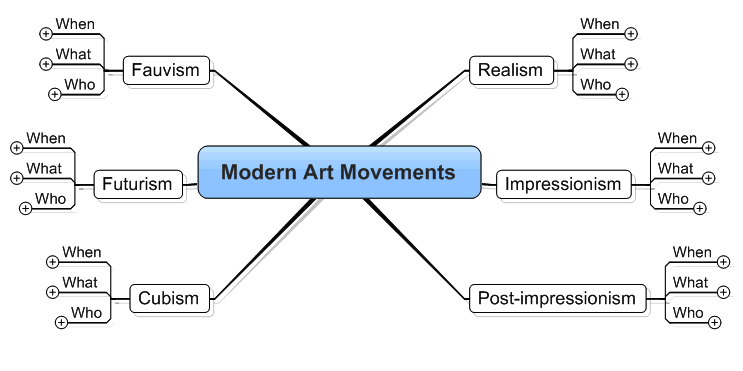
On the TES website I quite liked this mind map.


It could be put up on a Smart board and used as a prompt for students to review their knowledge of Modern Art movements. I hope to utilise this during my teacher training.

Tuesday, 21 October 2014

Can on-line mind maps enhance Learning & Teaching?

I wanted to know if I could use an on-line mind map in place of a handout or PowerPoint for use in an art class.  I got thinking and recalled two examples of mind maps used in contemporary artworks (shown below).  These formed the inspiration for making my own mind map on The Birth of Modern Art.  
Jeremy Deller, History of the World, 1997 - 2004
From Tate website
Peter Davies, 'Super Star F***er', 2001
From Liverpool Museum website.

The examples show how creative and expressive a hand drawn mind map can be. They are exciting and engage you in looking and wanting to learn more.

The first on-line mind map I tried making using Bubbl.us, looked dead as a flat balloon in comparison.  Mindmup and Stormboard were similarly uninspiring and also a hassle to sign into.  So let's focus on a few that I engaged well with.
Creately
I worked intuitively with Creately; it was fun, quick to get going and best of all - very creative. (For dates and names of movements I used about.com which I would recommend to students.) As a first attempt I think it is promising and will develop this to use in class.

text2mindmap was easy to use and quick to start. The mind map is created by typing a list at the side panel of the screen. To have 'trees' organised you simply press tab.  It's perfect for building a quick clear mind map with simple objectives.

popplet is great too. I love the way you can easily embed video from YouTube or Vimeo.  It's simple and swift to build and could work well in a classroom.  A great alternative to PowerPoint; you just click on Presentation mode.
popplet

References
1. http://www.tate.org.uk/art/artworks/salcedo-shibboleth-i-p20334
2. http://www.oxfordlearnersdictionaries.com/definition/english/shibboleth
3. https://www.youtube.com/watch?v=NIJDn2MAn9I

Friday, 10 October 2014

Introduction

I am new to the world of blogging and also to using technology in teaching.  So beginning on this Voyage of Discovery of how ICT can be used in the classroom is daunting.  I am open minded and believe that ICT is essential in the classroom.  The problem is the vast universe of ICT software out there and where to start.

I begin teaching on the First Award in Art and Design on Friday 7th November.  My hours of observation have been completed, I have begun to get to know the students and I have written a lesson plan.  I feel ready.  "ICT in education is the key to unlocking the skills and knowledge of our future generations of young people.  It is the tool for learning for the 21st century." (McKenzie, 2014).  In this blog I discover if Kate McKenzie's words ring true.

Reference
McKenzie, Kate, (2014) 'ICT in Education is important!'. Available at: http://www.naace.co.uk/1068 [Accessed: 10th October 2014]